
Showing posts with label unity. Show all posts
Showing posts with label unity. Show all posts
Friday, May 28, 2010


Saturday, May 22, 2010
??Saturday Bullcrap?? More Food!
No Bullcrap vid this time, not really enough moving stuff to show off, I don't think anyone wants to see a buffalo burger spin in circles for a minute or so. Anyhow, a few more food items, a bottle of Snake Oil, and a Sugared Rabbit Foot. PIC!

Ok, so these food items are power-up items, so let me tell you what they'll do for good ol' Beardy. These all have a minute long duration. Testing may change some of this of course.
Buffalo Burger - Raises attack power, movement speed is unaffected by large items.
Chicken Feet - Increases movement speed and you are immune to slow effects.
Turtle Jerky - Stamina is increased, immune to pain, cannot be knocked out, cannot be dazed.
Sugared Rabbit Foot - Increases luck, zero cave-ins.
Snake Oil - Faster stamina regeneration, cures poison and cold.
I managed to get some of the item pick-up code into place, the item spins, you walk into it and it destroys itself. This all prompted me to get the player stat variables in order to begin passing these effects onto the player.
Alright, have a good weekend.

Ok, so these food items are power-up items, so let me tell you what they'll do for good ol' Beardy. These all have a minute long duration. Testing may change some of this of course.
Buffalo Burger - Raises attack power, movement speed is unaffected by large items.
Chicken Feet - Increases movement speed and you are immune to slow effects.
Turtle Jerky - Stamina is increased, immune to pain, cannot be knocked out, cannot be dazed.
Sugared Rabbit Foot - Increases luck, zero cave-ins.
Snake Oil - Faster stamina regeneration, cures poison and cold.
I managed to get some of the item pick-up code into place, the item spins, you walk into it and it destroys itself. This all prompted me to get the player stat variables in order to begin passing these effects onto the player.
Alright, have a good weekend.
Wednesday, May 19, 2010
Strange Food
Been modeling some of the powerups for BM. Pictured below, from left to right, Buffalo Burger, Chicken Feet, and Turtle Jerky. Oh, that's the Crush Axe I mentioned some posts back, never had a pic of it, so there you go.

I'm wanting to get a few more items done and start coding the drop tables and actual items/effects themselves.

I'm wanting to get a few more items done and start coding the drop tables and actual items/effects themselves.
Wednesday, May 12, 2010
Sand everywhere!
No, I'm not at the beach. I finished up the Sand Wall block, it is fully functional. When you destroy them, they destroy other sand wall blocks that neighbor them in a chain reaction.

I did the Crush Axe texture today, no pic, silly 3DS renders it wonky. Also started texturing Beardy.


I did the Crush Axe texture today, no pic, silly 3DS renders it wonky. Also started texturing Beardy.

Monday, May 10, 2010
Dirty Particles
Got particles working for the dirt wall block, looks good too. In motion anyway. There are two that fire off, one for the debree and another for kicking up a dust cloud. Until Friday, here's a pic.

Currently working on the sand wall block, got the model done, just need to texture and get it in game. After that I think I'll texture up Beardy(whom is all rigged up thanks to Jay) and that Crushaxe(thanks to Art) which is pictured below.


Currently working on the sand wall block, got the model done, just need to texture and get it in game. After that I think I'll texture up Beardy(whom is all rigged up thanks to Jay) and that Crushaxe(thanks to Art) which is pictured below.

Friday, May 7, 2010
Wednesday, May 5, 2010
Easier floors.
YES! Forget that tile crap, Unity has terrain. You paint your textures onto it, well, some kind of alpha layers allow multiple textures to show through, I think. Anyway, it's pretty awesome, a ton of freedom for little texture memory cost. A picture perhaps? Yep.

Terrain does more as well, geometry like trees or rocks, grass, very cool.

Terrain does more as well, geometry like trees or rocks, grass, very cool.
Saturday, May 1, 2010
Monday, April 26, 2010
More Explosives.
Yes, but just 3 more.
You best face this one forward, the BFF bomb.

The POW Keg, nothing fancy, just a very large explosion.

The Stink Bomb. Fling crap everywhere, repels some monsters and humans in general.

Also, here's a pic of some wall action.

I plan to finish up another wall chunk and then do some floor tiles.
You best face this one forward, the BFF bomb.

The POW Keg, nothing fancy, just a very large explosion.

The Stink Bomb. Fling crap everywhere, repels some monsters and humans in general.

Also, here's a pic of some wall action.
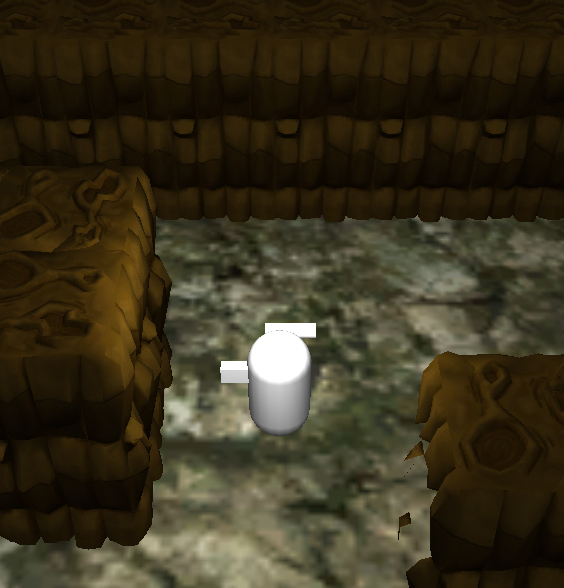
I plan to finish up another wall chunk and then do some floor tiles.
Wednesday, April 14, 2010
Old alien model finally serves purpose!:O
Ok, to test out the model importing in unity, I dug up an old alien I did years ago to throw in there. It's a smooth process for certain, this singular picture is my only proof!

Also, I have completed a model sheet for old Beardy. It's pretty bare bones but will hopefully do the job for now.

I want to get a few more things drawn up before going back to the game script itself. Working on Rabid Cavecoon and some items, such as pickaxes and dynamite.

Also, I have completed a model sheet for old Beardy. It's pretty bare bones but will hopefully do the job for now.

I want to get a few more things drawn up before going back to the game script itself. Working on Rabid Cavecoon and some items, such as pickaxes and dynamite.
Monday, April 12, 2010
Dirt B Gone
Right, got the collision working on that "pickaxe" action. So the damage numbers are passed and things will happen. Gif on this!

Working on some concept art, right now I'm working on Beardy's character sheet. Here's some walls.


Working on some concept art, right now I'm working on Beardy's character sheet. Here's some walls.

Friday, April 9, 2010
Wednesday, April 7, 2010
Camera Action!
Not as exciting as the title makes it out to be. I got the player camera working. It sits pretty at the 3/4ths overhead and when sight of your character is obstructed, it swings a little closer and higher to give you and overhead vantage. The movement starts out quick and eases in slow. I have a timer on there also that has to count down before it swings back to normal to keep it from bobbing if you are moving behind segmented walls. There may be changes to how this works later of course, but for now it's good to go. I'll most likely show this off on Friday, so until then.


Monday, April 5, 2010
Dumbass.
That's me. I got the collision detection working. My problem, I was translating the object's position using the Transform class instead of using the CharacterController class. Hurf durf! Anyway, I'll most likely work on the game camera next, get it to change it's position on the fly when a wall comes between it and the player.
Here's some progress on Beardy, I think the one on the far right is what form I want him to have. I've been working on boiling him down into simpler shapes, there are some small signs of that in this pic.

Here's some progress on Beardy, I think the one on the far right is what form I want him to have. I've been working on boiling him down into simpler shapes, there are some small signs of that in this pic.

Friday, April 2, 2010
Rotation works. Collisions don't.
I know you probably can't read a damn thing on that screen, but you can see the player mock up rotate correctly! I should note that the player object has no downward gravity at the moment, and when it did the collision for the ground box didn't work either. Grrrr.
I'll give this video thing a try every Friday.
Wednesday, March 31, 2010
Set frustration to maximum!
I'll lay this down, I'm not primarily a code guy. My origin point is more on the art side. Understanding some of the Unity scripting is driving me up the wall. This is going to sound pathetic to a lot of people, but I've spent the last few days trying to get an object face a certain direction based off it's last xyz to current xyz. Sad as hell, I know. What pisses me off the most is I'd most likely have 50% of this game prototyped in GameMaker by now, intead of this peasly 2-0%. I think, maybe, I'm starting to grasp this Classes thing and how they have their own variables and functions, and you instance these in the code, and this jazz is applied to whatever asset the script is assigned to. I researched the math(trigonometry??) behind the actual finding of these things also, helped me understand better, but not solve the problem. Man was I enraged earlier, good thing I had that chili and a Cavs game to watch. I'm rambling now, I'll try this stuff again tomorrow, damnit.
Monday, March 29, 2010
Beardy has a beard.
Here are some roughs for the main character, Beardy. Was trying to find a look for him face wise obviously. Anyhow, the story so far on him, he's returned to Bad Mountain after all these years(it kicked his ass when he was younger) to dig out it's black heart, and also to loot it. He has gambling debts and bar tabs that need paid, and some new teeth would be nice, maybe a swank suit and an estate of his own.

Did some shark business today, and attempted to start prototyping the controls for this thing in Unity. I need to print some stuff off to have in front of me, having trouble keeping all this new info sorted mentally.

Did some shark business today, and attempted to start prototyping the controls for this thing in Unity. I need to print some stuff off to have in front of me, having trouble keeping all this new info sorted mentally.
Monday, March 22, 2010
A Good Mountain?
No, it's a Bad Mountain! At least that's what I'm refering to this new game as. If the name is not taken by the time this is further underway, I'll go with it. Here's some crap from my overview document, regarding the player and their actions.
"-Sneak,Walk,Run-
Sneaking is used to move without alerting certain monsters to your location. There may be certain terrain types that produce different outcomes given the speed of your movement.
Control - Analogue stick covers this. Keyboard control will require function keys in addition to movement keys.
-Dig with a Pickaxe-
Used to dig out obstacles(rock,dirt) or strike enemies. This method is much quieter than using explosives, but can take longer. Default Pickaxe has unlimited use.
Control - Button press.
-Drop/Throw Explosive(dynamite)-
Use dynamite(etc.) to blow up obstacles or enemies. This method is powerful and dangerous, but fast. It also has the added risk of causing cave-ins. Default Dynamite has unlimited use, the time it take to lay one stick is restricted.
Control - Button press will drop the dynamite in front of you. Holding the button will charge a throw, let go to release it. the longer you hold, the further the throw. Be careful as the dynamite is lit, don't let it blow up in your face.
-Turn On/Off Light source-
If the player has aquired a light source(torch/glow worm) they can hold it in their off hand, or pack it away.
Control - Button Press to swap on/off, hold button down while on to drop/throw similar to dynamite.
-Action-
Used to activate certain things in the environ, talking, picking up a special item, etc.
Control- Button, behavior my vary given the circumstance.
-Swap Equipment-
There may be more equipment that falls under Pickaxe/Explosive/Light that the player can store and use at anytime. Swap them out for when the need arises.
Control- Undecided. On a controller it may be the shoulder buttons swapping in a forward or backward manner for each action type. Keyboard, could be hotswapped with number keys as well as the controller method.
-Talk/Shop-
Player may encounter characters that will talk or sell items, powerups.
Control- See Action. Shopping will have the player selecting from stock to purchase.
-Pick up, Drop, Throw Big Item-
There may be large objects in the environment that the player can manipulate, like a box, or a fungus. The player can only move while doing this, and their speed may be affected.
Control - See Action. Dropping/Throwing the item would function the same as throwing dynamite.
-Pick up Goodie-
Simply move over top of the item to collect it. This could be gold, bones, gemstones, etc.
Control - Duuurr.
-Check Backpack-
Brings up a screen detailing collected items and tools, selecting them gives a closer view with details on various things, like worth, power, uses, etc.
Control - Controller would be select, keyboard would be any non essential key.
*****Life and Death*****
A tolerence meter of sorts, as in a player gets hit, a bit is shaved off, if they remain out of harms way for a few seconds it starts to regenerate. Of course, if it is depleted, they will die in a horrible fashion depending on what did them in. The player can choose to continue on the same map, but doing so will cost collectables and strip them of their extra items/powerups. They could just hang it up and have their corpse/ghost haunt that stage in future games."
I generally have an overview document that details basics for everything, and then break off with more documents with details if needed. I don't know how the pros do it, but I also work primarily alone(at the moment). I have made an effort to outline more though, as it is a help to keep things organized.
I'm working on documenting different types of destructable walls. I also have a few rough sketches for character and monster ideas, but that comes later.
Got a bit more of one Unity tutorial left, and I've already started going over the script functions and such. Hopefully I can get to prototyping in a week.
"-Sneak,Walk,Run-
Sneaking is used to move without alerting certain monsters to your location. There may be certain terrain types that produce different outcomes given the speed of your movement.
Control - Analogue stick covers this. Keyboard control will require function keys in addition to movement keys.
-Dig with a Pickaxe-
Used to dig out obstacles(rock,dirt) or strike enemies. This method is much quieter than using explosives, but can take longer. Default Pickaxe has unlimited use.
Control - Button press.
-Drop/Throw Explosive(dynamite)-
Use dynamite(etc.) to blow up obstacles or enemies. This method is powerful and dangerous, but fast. It also has the added risk of causing cave-ins. Default Dynamite has unlimited use, the time it take to lay one stick is restricted.
Control - Button press will drop the dynamite in front of you. Holding the button will charge a throw, let go to release it. the longer you hold, the further the throw. Be careful as the dynamite is lit, don't let it blow up in your face.
-Turn On/Off Light source-
If the player has aquired a light source(torch/glow worm) they can hold it in their off hand, or pack it away.
Control - Button Press to swap on/off, hold button down while on to drop/throw similar to dynamite.
-Action-
Used to activate certain things in the environ, talking, picking up a special item, etc.
Control- Button, behavior my vary given the circumstance.
-Swap Equipment-
There may be more equipment that falls under Pickaxe/Explosive/Light that the player can store and use at anytime. Swap them out for when the need arises.
Control- Undecided. On a controller it may be the shoulder buttons swapping in a forward or backward manner for each action type. Keyboard, could be hotswapped with number keys as well as the controller method.
-Talk/Shop-
Player may encounter characters that will talk or sell items, powerups.
Control- See Action. Shopping will have the player selecting from stock to purchase.
-Pick up, Drop, Throw Big Item-
There may be large objects in the environment that the player can manipulate, like a box, or a fungus. The player can only move while doing this, and their speed may be affected.
Control - See Action. Dropping/Throwing the item would function the same as throwing dynamite.
-Pick up Goodie-
Simply move over top of the item to collect it. This could be gold, bones, gemstones, etc.
Control - Duuurr.
-Check Backpack-
Brings up a screen detailing collected items and tools, selecting them gives a closer view with details on various things, like worth, power, uses, etc.
Control - Controller would be select, keyboard would be any non essential key.
*****Life and Death*****
A tolerence meter of sorts, as in a player gets hit, a bit is shaved off, if they remain out of harms way for a few seconds it starts to regenerate. Of course, if it is depleted, they will die in a horrible fashion depending on what did them in. The player can choose to continue on the same map, but doing so will cost collectables and strip them of their extra items/powerups. They could just hang it up and have their corpse/ghost haunt that stage in future games."
I generally have an overview document that details basics for everything, and then break off with more documents with details if needed. I don't know how the pros do it, but I also work primarily alone(at the moment). I have made an effort to outline more though, as it is a help to keep things organized.
I'm working on documenting different types of destructable walls. I also have a few rough sketches for character and monster ideas, but that comes later.
Got a bit more of one Unity tutorial left, and I've already started going over the script functions and such. Hopefully I can get to prototyping in a week.
Friday, March 19, 2010
Learnin' and Burnin'
That burnin' part is made up, I've set flame to nothing.
I continue my trip in Unity tutorial land. Nothing to report there really, you move forward, and all is well.
Laying down some ideas for a game, it's one of those thought rushes you can taste, you can see it play out in your head, and it is good! A few basics.
-Top down 3rd person.
-A maze like cave setting with static and random elements.
-An eco-system comprised of various quirky(yet deadly) creatures/plants that can be pitted against each other.
-Primary player interactions include moving, digging(pick-axe), explosives. Explosives are faster than digging, but cause loud noise/vibrations and the potential for cave-ns. Digging is quiet but slow.
-Grab the goodies and find a way out.
-I'd like some multiplayer co-op or competitive, with other varied game modes.
Basics for now. I mean, there's some more in depth stuff, but I have to have something to talk about next time.
I continue my trip in Unity tutorial land. Nothing to report there really, you move forward, and all is well.
Laying down some ideas for a game, it's one of those thought rushes you can taste, you can see it play out in your head, and it is good! A few basics.
-Top down 3rd person.
-A maze like cave setting with static and random elements.
-An eco-system comprised of various quirky(yet deadly) creatures/plants that can be pitted against each other.
-Primary player interactions include moving, digging(pick-axe), explosives. Explosives are faster than digging, but cause loud noise/vibrations and the potential for cave-ns. Digging is quiet but slow.
-Grab the goodies and find a way out.
-I'd like some multiplayer co-op or competitive, with other varied game modes.
Basics for now. I mean, there's some more in depth stuff, but I have to have something to talk about next time.
Wednesday, March 17, 2010
Boooooooorrrriiinngggggg!
Not much to say really. I've contacted a few distribution services, waiting to hear back. I have a few portal sites to try later, but doing only a few at a time as there may be a need for special builds of the game. Don't want to be rushed in too many different directions.
In the meantime, I'll most likely get back into Unity, and maybe jot down some game ideas, I've had one brewing these last couple days.
In the meantime, I'll most likely get back into Unity, and maybe jot down some game ideas, I've had one brewing these last couple days.
Subscribe to:
Posts (Atom)